Published October 14, 2026
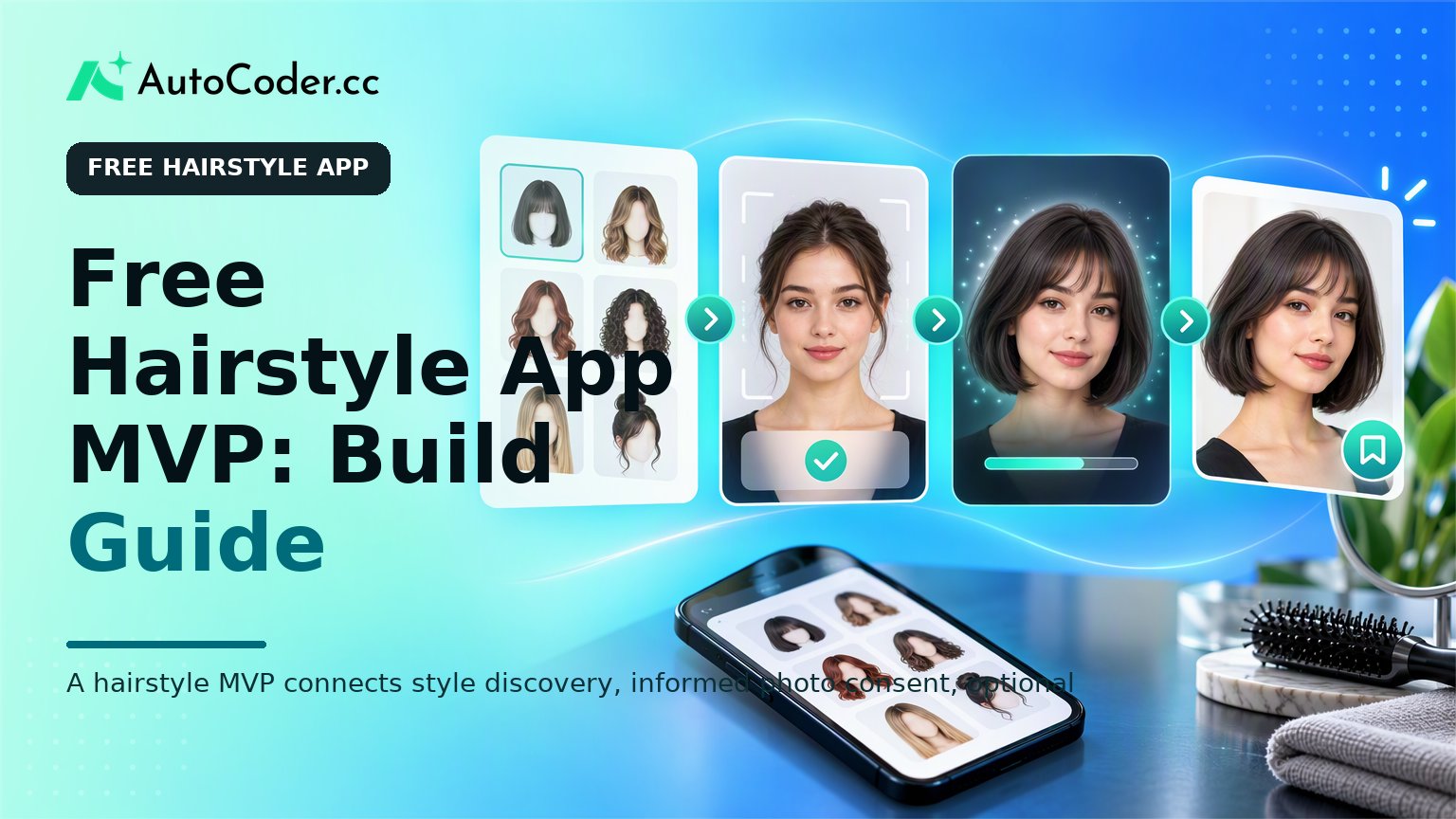
A product planning board shows the journey from hairstyle reference selection to consent-based photo preview and saved look.

A hairstyle MVP connects style discovery, informed photo consent, optional external processing, and a saved result rather than treating try-on as an isolated feature.

A free hairstyle app can be a practical way to help prospective clients explore haircut references, organize preferences, or preview selected looks before a salon consultation. The MVP challenge is not to reproduce every hairstyle or promise an exact result. It is to establish one useful decision-making flow, handle personal photos carefully, and learn whether users return to save, compare, or discuss styles. For entrepreneurs, salon operators, and product teams, the most workable first release usually combines a small style catalog with a clear photo-based experience. Virtual try-on can be included, but it depends on separate image-processing capabilities and should be framed as a visual aid rather than a salon guarantee.

Choose a Narrow Free Hairstyle App MVP

Start by defining one audience and one decision the app should help them make. A broad app for every hair type, occasion, and style service is difficult to explain, test, and maintain. A narrower starting point makes the content, interface, and technical choices more coherent. For example, an MVP might serve salon clients who want to collect short-hair references before booking. Another might help users compare a limited set of fringe or bob variations using their uploaded photo. A salon-facing version could let a stylist prepare a small look board for a consultation. Before building, write a short product statement in this format: “For [specific user], this app helps them [specific action] by [specific method].” An example is: “For clients considering a shorter cut, this app helps them save and compare a curated set of reference styles before a consultation.” This statement becomes a filter for feature decisions. Choose one of these initial product models:
  1. Style discovery: Users browse curated references, filter by attributes you define, save favorites, and prepare a shareable list for a stylist. This model does not require image generation. 2. Guided recommendation: Users answer a short set of preference questions and receive a small set of relevant style references.
It is possible to combine discovery with virtual preview, but only if each feature supports the same core decision. Avoid adding booking, product commerce, stylist marketplaces, social feeds, and broad beauty advice simply because they are adjacent ideas. They can be considered later if the basic user journey is useful.

Prerequisites before you build

Prepare the operating decisions before you create screens. Even a small beauty app should have answers to a few foundational questions.
  • Define the intended geography, age assumptions, and whether the product is consumer-facing, salon-facing, or both. - Obtain rights or permission to use every reference image in the style catalog. - Draft plain-language copy explaining what happens to uploaded photos and generated outputs.
These choices do not need to become a lengthy policy exercise at prototype stage. They do need to be explicit. A product team cannot responsibly design a photo-upload flow if it has not decided whether images are stored, for how long, and how users can ask for removal.

Map the Core User Journey Before Designing Screens
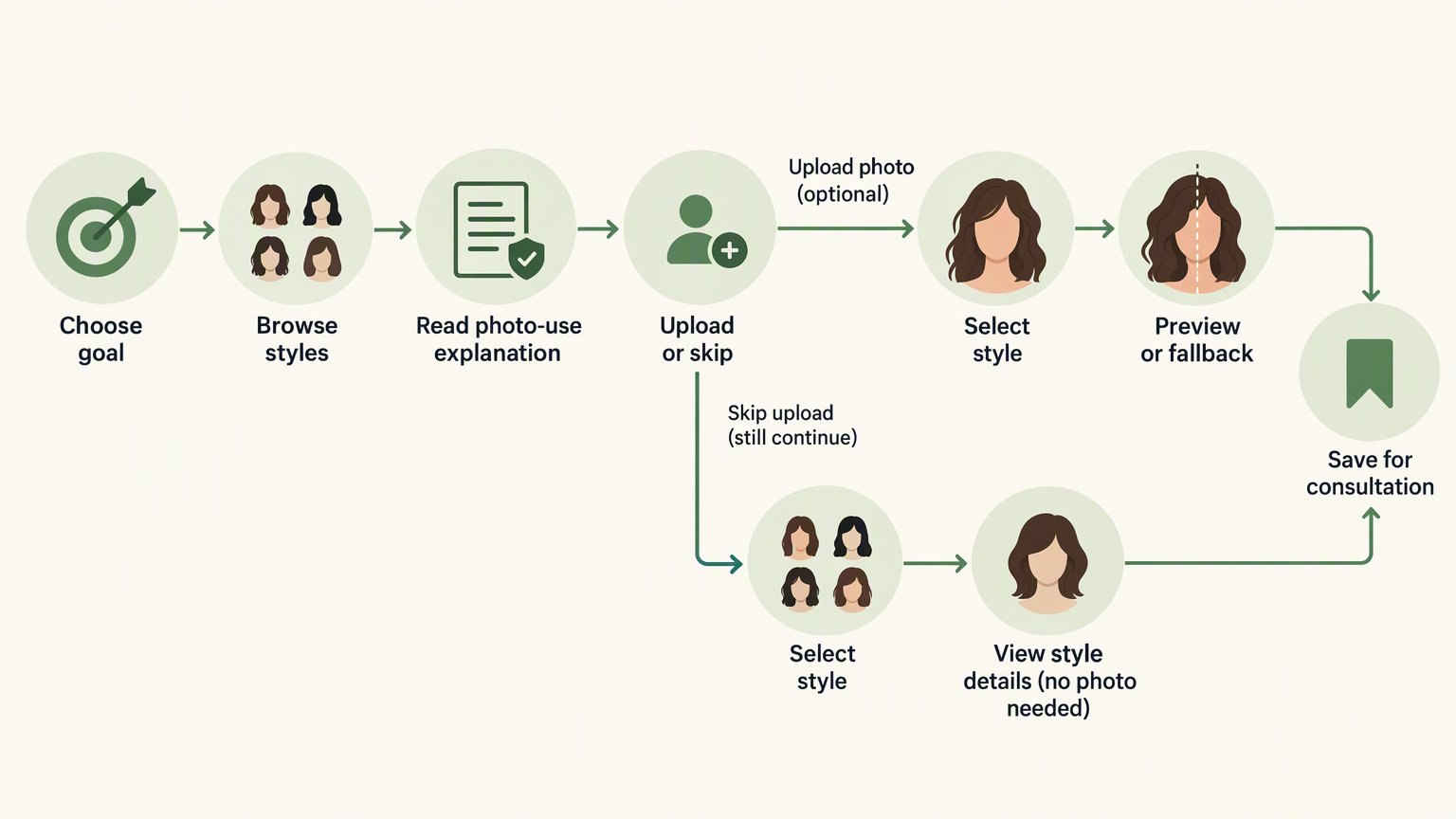
Diagram of the user journey from style goal through consent and upload to saved hairstyle references.

The photo-upload step should be optional where possible and placed after users understand the benefit and image-use terms.

Design the shortest complete path from intent to a usable result. The core flow should show a new user what to do, make any image permissions understandable, and give them a reason to save or share the outcome. For a discovery-led MVP, the path may be: select an objective, browse a focused catalog, open style details, save several references, and export or share a consultation list. For a virtual hairstyle try-on app, the sequence usually includes photo capture or upload, consent, image checks, style selection, processing, results, and an option to save or delete. Use the following numbered steps to map that path.
  1. Set the entry point. Ask a simple question that routes users into the relevant experience, such as whether they are looking for inspiration, preparing for a haircut, or comparing a specific style category. Do not request a photo before the user understands why it is needed.
  2. Explain the value and limitations. Before an upload, say what the image is used for and state that a preview is illustrative. Hair texture, color history, lighting, face angle, styling technique, and a stylist’s assessment can all affect the final salon result.
  3. Collect consent in context. Place consent near the photo action, rather than hiding it in a distant settings page. Describe whether the image is sent to an external processing service, whether it is retained, and how the person can delete it.
  4. Guide image capture. Give practical instructions: use a clear, front-facing image; keep the face unobstructed; use even light where possible; and avoid filters. A simple quality check can ask the user to retake the image when it is too dark, angled, or obscured.
  5. Limit style selection. Start with a manageable group of styles that your app can describe clearly. Each option can include reference imagery, length category, maintenance notes supplied by your editorial team, and a label that differentiates it from nearby options. A huge, poorly organized catalog makes comparison harder.
  6. Present the result with control. If an AI-generated preview is available, show the selected style name, a visible reminder that it is a simulation, and actions to try another look, save the result, or delete the photo and output. If processing fails, explain the next step without blaming the user.
  7. Close the loop. Let users save a private list, share a reference collection, or prepare a concise note for a stylist. This creates practical value even when the virtual preview is unavailable or inconclusive.
Map the flow on one page before creating detailed visual designs. For every screen, identify the user’s immediate task, the information needed to complete it, and the action that moves them forward. This prevents the common MVP problem of attractive individual screens that do not form a coherent experience.

Specify the Technical Components and External AI Boundary
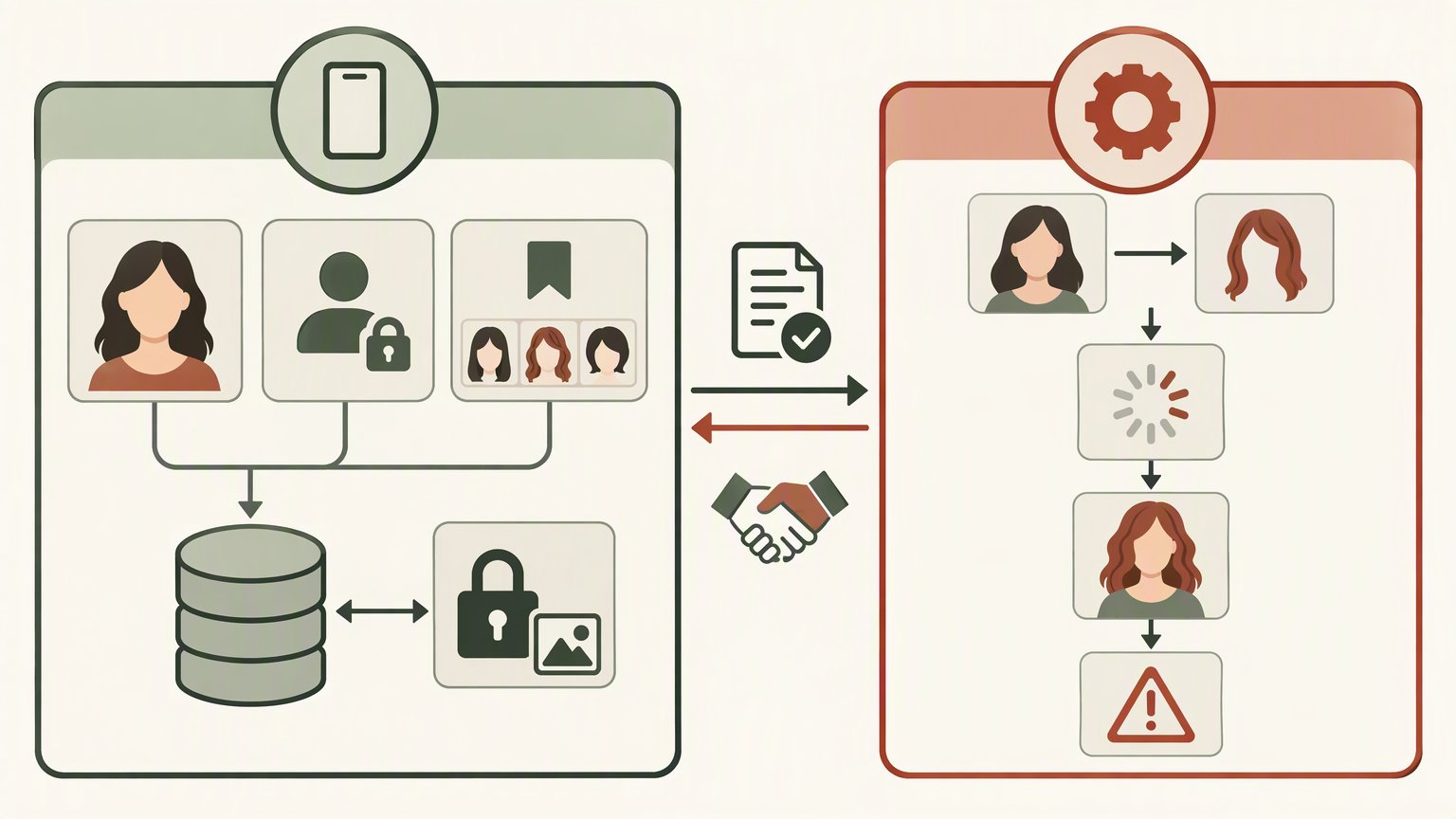
Layered diagram separating the hairstyle app foundation from an external image-processing service.

The full-stack app and any virtual try-on AI service are separate components with different responsibilities and risks.

Separate the application foundation from the image-generation capability. A hairstyle simulator app needs ordinary product infrastructure as well as, potentially, an external service that can process images. Treating these as distinct layers makes the build easier to assess and change. The application foundation normally includes a responsive frontend, authentication if accounts are required, a database for user preferences and saved looks, and protected media handling for uploads and generated assets. You also need administrative controls appropriate to your content plan, such as managing style records or reviewing reports. A full-stack builder such as AutoCoder’s AI app builder can help translate a written MVP specification into editable frontend, backend, database, authentication, and deployment components. That does not replace the need to define the product rules. It gives the team a starting implementation for the surrounding application, while the team remains responsible for data handling, design review, and integration decisions. For virtual try-on, evaluate an external image-processing or generative AI capability separately. The provider should be assessed against your use case rather than assumed to solve every hairstyle scenario. Document the inputs it accepts, how it returns outputs, error conditions, data-processing terms, and any technical limits that matter to your proposed user flow. A practical data model might include user records, style records, saved-style relationships, consent records, upload metadata, processing jobs, generated-result metadata, and deletion status. Store only what the experience requires. If a feature does not need the original photo after an output has been delivered, consider whether retaining it is necessary at all. Write a build brief that lists the following before implementation:
  • Pages and states: landing, browse, style detail, upload, consent, processing, results, saved looks, and deletion or account settings. - User permissions: what a guest can do, what requires an account, and who can administer content. - Data lifecycle: what is stored, what is transmitted externally, and what triggers deletion.
This is also where a beauty app MVP should set boundaries for copy. Avoid claims that a preview identifies what “suits” a user or that it predicts an exact outcome. A useful app can support discussion and exploration without turning uncertain visual output into an authoritative recommendation.

Build, Test, and Review the Experience Responsibly

Validate reliability and clarity before inviting a wider audience. A functional happy path is not enough when the product accepts personal images and creates appearance-related outputs. Test the points at which real users may become confused, receive an unusable result, or need to remove their data. Build the first version in a controlled sequence. Create the style catalog and browsing flow first, then saving and sharing, then photo handling and external AI integration if it remains justified. This ordering ensures the product retains some value if image generation is delayed, fails for a given image, or proves too inconsistent for the initial release. Test with a varied set of images for conditions relevant to the experience: different lighting, face angles, hair lengths, hair textures, colors, accessories, and partially obstructed faces. The purpose is not to claim broad performance. It is to identify where the flow needs clearer instructions, better validation, or an honest fallback. Review these areas before a limited launch:
  • Privacy and deletion: Confirm that the stated deletion path works for uploads, generated outputs, and saved records where applicable. - Consent language: Check that a user can understand image use before submitting a photo, including any external processing.
Capture qualitative feedback around the actual decision users are making. Do they understand why a photo is requested? Can they find and compare styles without assistance? Do they know how to remove an image? Would a saved look make a salon conversation more concrete? As the MVP develops, AutoCoder can support iteration on the editable application and its full-stack components. The external virtual try-on service, if used, remains a separate dependency to monitor and evaluate. Keep that distinction visible in internal planning so product claims remain aligned with the system actually being built.

FAQ

How does a free hairstyle app work?

A free hairstyle app commonly lets users browse style references, save favorites, and share a shortlist. Some apps also accept a user photo and send it to an external image-processing service to create a visual preview. The exact flow depends on the product scope and its photo-handling rules.

What features should a hairstyle try-on MVP include?

A focused MVP should include style selection, clear photo-upload guidance, informed consent, processing and error states, results that can be saved or deleted, and a small reference catalog. It should also explain that previews are illustrative and do not guarantee a salon outcome.

Do I need AI image processing for a virtual hairstyle app?

You generally need an image-processing or generative AI capability if users expect a transformed preview using their own photo. You do not need it for a style-discovery app built around curated references, preference collection, and consultation preparation.

How should a hairstyle app handle user photos?

Explain the purpose of the photo before upload, obtain relevant consent, protect uploads in transit and storage, limit retention to what is needed, and provide a clear deletion route. If an external service processes images, disclose that part of the flow in plain language.

Conclusion

A useful free hairstyle app MVP should make one hairstyle decision easier while treating personal images and simulated outputs with care. Begin with a narrow audience, a small catalog, and a complete path from discovery to saved references. Add virtual try-on only when the external AI capability, consent flow, data lifecycle, and result limitations have been specified clearly. That approach creates a product foundation that can be tested honestly before broader feature expansion.