

What Is Vibe Coding?
Vibe coding is a paradigm shift in how software gets built. Instead of writing code line by line, you describe what you want in natural language, and an AI agent generates the application for you. Karpathy’s original description captured the essence: “fully give in to the vibes, embrace exponentials, and forget that the code even exists.” You focus on the idea, the problem you’re solving, the value you’re creating — and the AI handles the implementation. But in the year since that tweet, the definition has evolved. Early vibe coding tools could generate a landing page or a simple UI mockup. Today’s vibe coding platforms can generate complete, full-stack applications — frontend, backend, database, authentication, and deployment — from a single natural-language prompt. Vibe coding is not no-code. No-code tools give you visual builders with pre-defined blocks. Vibe coding gives you an AI engineer that writes original code for each project. The difference is flexibility: no-code hits a ceiling when your needs don’t fit the template; vibe coding adapts to whatever you describe. Vibe coding is not traditional development. You don’t need to learn syntax, frameworks, or deployment pipelines. You need to learn one skill: describing what you want clearly.Why Vibe Coding Matters Now
The timing of vibe coding’s rise isn’t accidental. Three converging trends have created the conditions for it to become mainstream.The Developer Shortage Is Real
82% of businesses report a shortage of developer talent. Development backlogs at most organizations stretch months — sometimes years — into the future. The demand for software far exceeds the supply of people who can write it. Vibe coding doesn’t replace developers. It amplifies them. A senior developer using vibe coding can ship 5x faster. A non-technical founder using vibe coding can build their MVP without waiting for a technical co-founder to free up.AI Capability Has Crossed a Threshold
The progress in AI code generation has been extraordinary. In 2022, AI could autocomplete a few lines. In 2023, it could generate entire functions. In 2024, it could scaffold a full feature. In 2025 and 2026, AI can generate complete, production-ready applications — and it keeps getting better at roughly 2x capability every 7 months. We’ve crossed the threshold where AI-generated code is not just “good for AI” — it’s genuinely useful for real projects.The Economics of Software Have Changed
Hiring a development agency to build an MVP costs 100,000+. Building it yourself takes months of learning. Vibe coding collapses both the cost and the time. A working prototype in hours. A production-ready app in days. The barrier to building software has never been lower.The Old Way vs The Vibe Coding Way
Let’s compare the traditional development workflow with the vibe coding workflow.Traditional Development
- Idea — You have a concept
- PRD — A product manager writes a 20-page requirements document (1-2 weeks)
- Design — A designer creates mockups in Figma (1-2 weeks)
- Frontend — A developer builds the UI (2-4 weeks)
- Backend — A developer builds APIs and database (2-4 weeks)
- Integration — Frontend and backend are connected (1 week)
- Testing — Bugs are found and fixed (1-2 weeks)
- Deploy — DevOps configures servers and deploys (1 week)
Vibe Coding with AutoCoder
- Idea — You have a concept
- Prompt — You describe it in natural language (15 minutes)
- Framework — AI proposes a project structure (3 minutes)
- Generate — AI generates the full frontend and backend (8 minutes)
- Refine — You iterate through conversation (15 minutes)
- Deploy — One click, your web app is live (2 minutes)
How AutoCoder Redefines Vibe Coding
Most vibe coding platforms share a common limitation: they’re frontend-only. They generate beautiful UIs but leave you figuring out backend, database, authentication, and deployment on your own. AutoCoder was built from the ground up as a full-stack vibe coding platform. When you describe your idea, AutoCoder doesn’t just generate a UI — it generates everything:What AutoCoder Generates
| Layer | What AutoCoder generates |
|---|---|
| Frontend | React + Tailwind CSS + shadcn, powered by AutoCoder’s custom build engine — complete, responsive, production-quality |
| Backend | Server Actions on self-healing runtime |
| Database | Auto-migrated DDL from Prisma schema |
| Authentication | JWT-based auth with role-based access control (RBAC) built in |
| Deployment | One-click deploy to a production URL with HTTPS and custom domain support |
| Admin Panel | A full back-end management dashboard generated alongside your main app |
The “No Lock-In” Difference
AutoCoder lets you export your complete source code anytime. You own the code, the database schema, the API endpoints — everything. If you decide to move to a different hosting provider or bring the project in-house, you can. This is a deliberate design choice: vibe coding should accelerate your development, not trap you in a proprietary ecosystem.The 7-Step Vibe Coding Workflow with AutoCoder
Here’s what the actual workflow looks like when you build with AutoCoder.Step 1: Write Your Prompt
Describe what you want to build in natural language. Be as specific or as broad as you like. Good prompts start with the big picture and layer in details:“Build an employee management system with employee list, search and filter by department, employee detail page with work history, role-based access for admin/HR/manager, and a dashboard with headcount charts.”AutoCoder parses your prompt and understands the feature set, data models, and relationships you need.
Step 2: Confirm the Framework
AutoCoder proposes a project structure: page tree, data models, feature modules. You review it and make adjustments — all in plain language. This step is crucial because it’s where you align on architecture before generation begins. Why this matters: In traditional development, changing the architecture after coding starts is expensive. In vibe coding, changing the framework after generation starts is slightly less expensive, but still more costly than getting it right upfront. AutoCoder’s framework preview gives you that checkpoint.Step 3: Get the Frontend
AutoCoder generates the complete frontend — React components, page routing, state management, TypeScript types, API integration layer. Everything is wired and ready.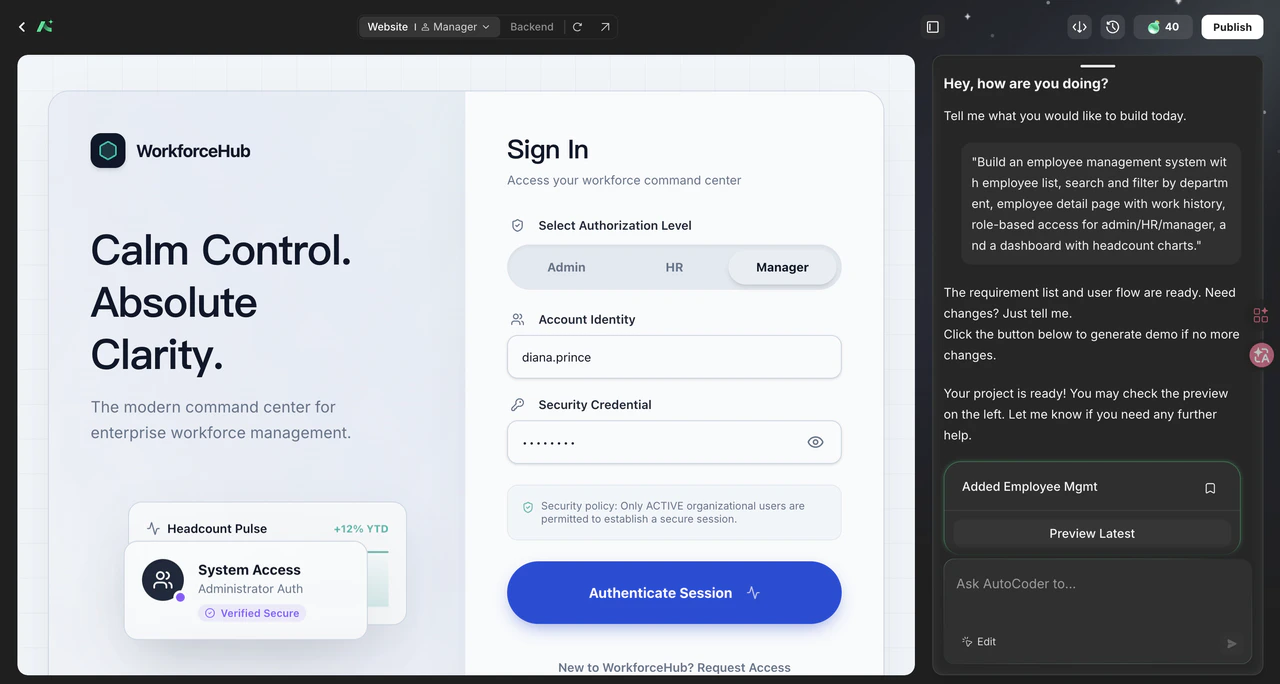
“Change the sidebar to dark mode.” “Add hover animations to the employee cards.” “Move the search bar to the top.”AutoCoder updates the code and preview instantly.
Step 4: Generate the Backend
This is where AutoCoder separates from other vibe coding platforms. The backend — API endpoints, business logic, data validation, authentication middleware — is generated automatically and wired to your frontend.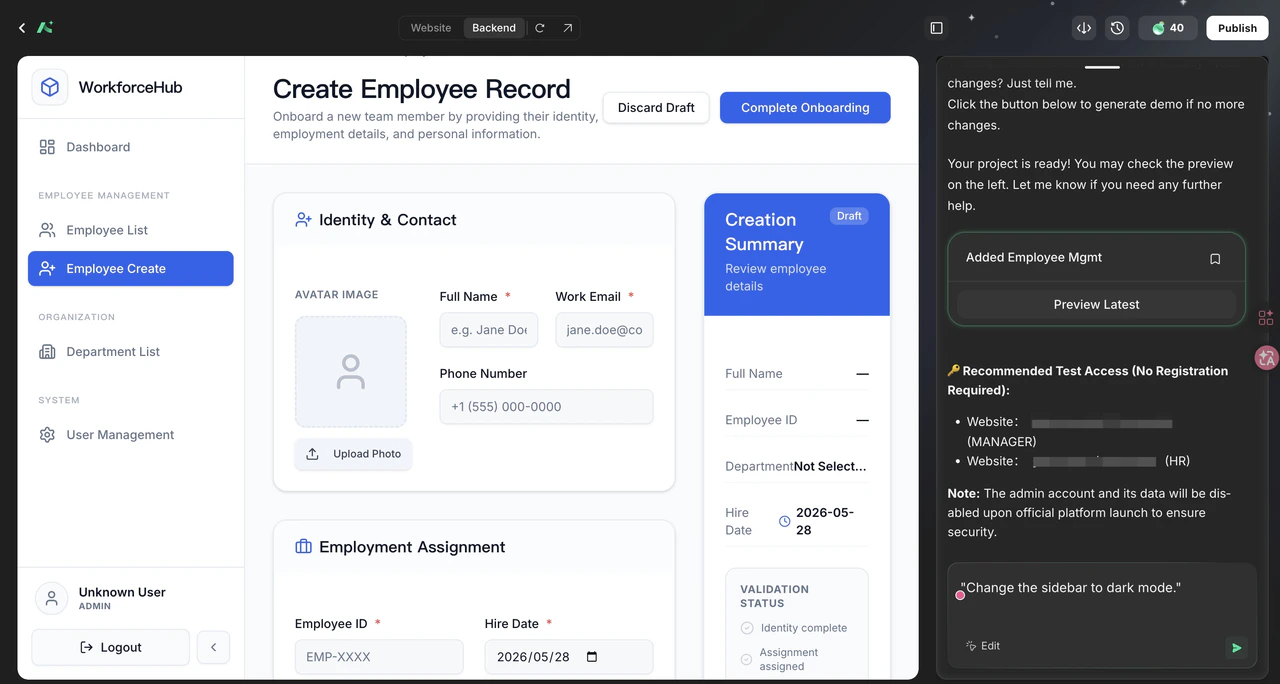
- Role-based access control (admin vs HR vs manager permissions)
- Authentication with JWT tokens
- Input validation and error handling
- File upload support for employee photos
Step 5: Refine Through Chat
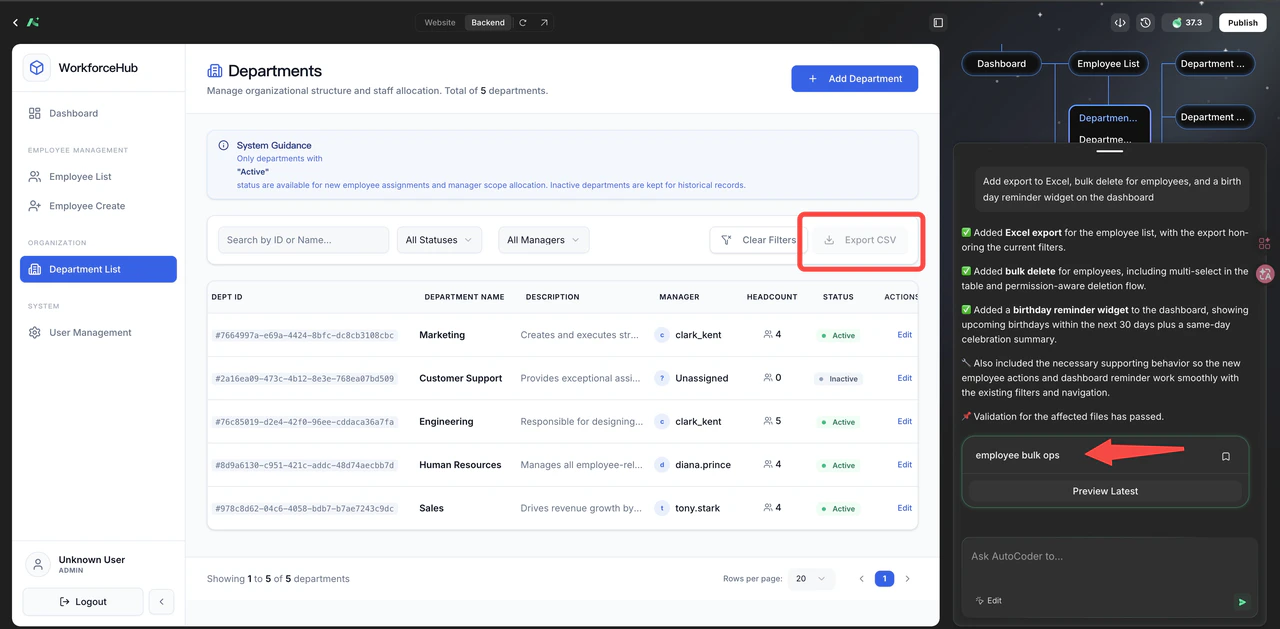
The generated app is ~80% complete. The remaining 20% comes through conversation. You can add features, tweak designs, modify data models — all by describing what you want. Batch your changes for efficiency:“Add export to Excel, bulk delete for employees, and a birthday reminder widget on the dashboard.”
Step 6: Review the Database
AutoCoder’s built-in database manager shows you the complete schema — tables, relationships, indexes, seed data. No SQL required. You can modify fields, add relationships, and configure constraints through the visual interface.Step 7: One-Click Deploy
When you’re satisfied, click “Deploy.” AutoCoder handles HTTPS, build optimization, server provisioning, and DNS. Your app is live at a production URL in minutes.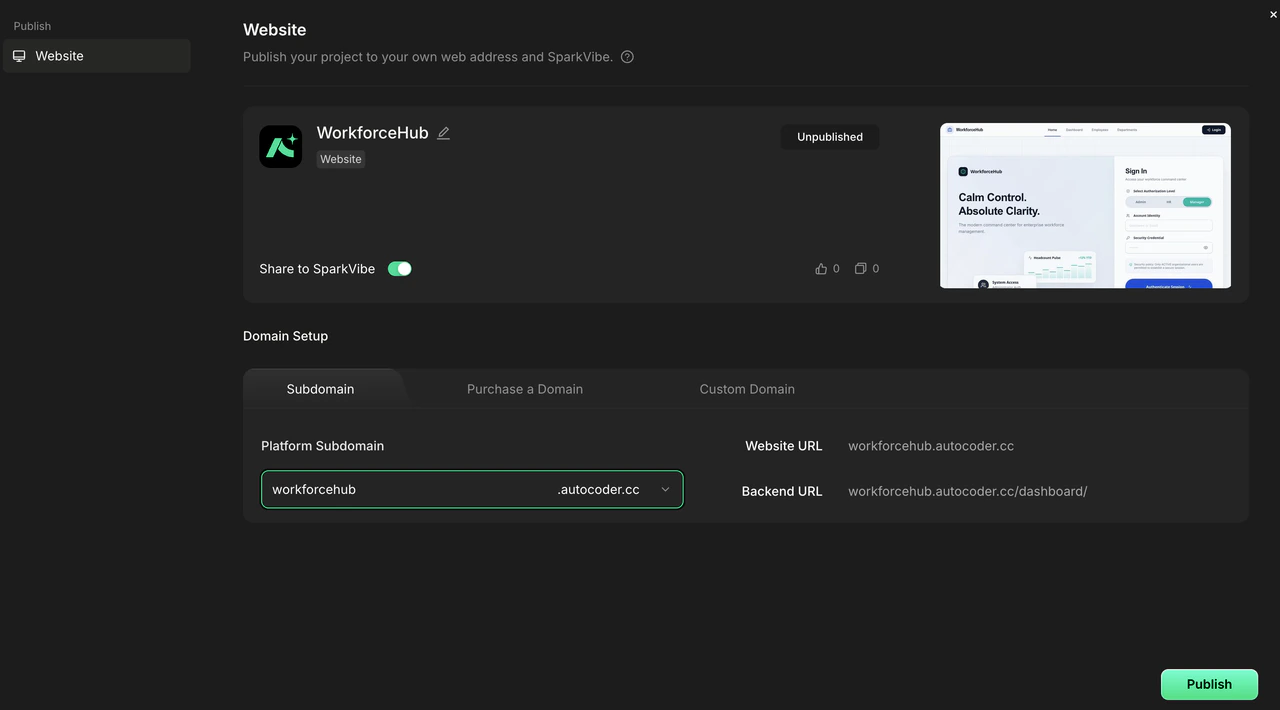
5 Tips for More Effective Vibe Coding
After watching hundreds of users build with AutoCoder, here are the patterns that separate successful projects from frustrating ones.1. Be Precise with Your Prompts
Vague prompts produce generic results. Specific prompts produce remarkable results.| Instead of | Try |
|---|---|
| ”Make a task manager" | "Build a task management app with kanban boards, drag-and-drop task reordering, due date tracking with calendar view, team assignments, and email notifications when a task is assigned to me." |
| "Create a landing page" | "Create a SaaS landing page with a hero section that has an animated gradient background, three feature cards with icons, a pricing table with three tiers (Free/99), and a testimonial carousel.” |
2. Build in Layers, Not in One Shot
Don’t try to describe everything at once. Start with the core functionality, get it working, then add features:- Round 1: “Build an employee management system.”
- Round 2: “Add a department filter to the employee list.”
- Round 3: “Add role-based access: admin sees everyone, manager sees only their department.”
- Round 4: “Add an export to Excel button.”
3. Use the Framework Preview
The framework preview is your most powerful tool. It’s where you catch architectural issues before they become code problems. Take the extra 2-3 minutes to review the proposed data models and page structure. Adjusting the framework is fast. Fixing a poorly designed database after features are built is not.4. Batch Related Changes
AutoCoder processes changes in conversation context. If you have multiple related changes, describe them together:“Change all buttons to use rounded corners, update the primary color to blue-600, increase card padding from 4 to 6, and add a subtle shadow to all cards.”This is more efficient than making each change separately.
5. Know What to Describe vs What to Code
AutoCoder handles ~80% of what most projects need. For the remaining 20% — complex custom interactions, specialized algorithms, unique animations — you can either describe them in detail or edit the generated code directly. AutoCoder supports both approaches. A good rule of thumb: if you can describe it, AutoCoder can build it. If you can’t describe it clearly, you probably can’t code it clearly either.Where Other Vibe Coding Platforms Fall Short
The vibe coding landscape has grown crowded. But most platforms share the same limitations.UI-Only Generation
Many platforms generate beautiful frontends and stop there. You’re left with a React component and the question “now what?” No backend. No database. No authentication. No deployment. AutoCoder’s response: Full-stack generation from a single prompt. Every project includes frontend, backend, database, auth, and deployment — wired together and working.Code Snippets Instead of Complete Apps
Some platforms give you code snippets that you have to piece together yourself. This works if you’re a developer who knows what you’re doing, but it defeats the purpose of vibe coding for non-technical users. AutoCoder’s response: Complete, runnable applications. Not snippets. Not boilerplate. A fully functional app.Proprietary Lock-In
Many platforms generate code that only runs on their infrastructure. You can’t export it. You can’t take it elsewhere. Your app is hostage to the platform’s pricing and uptime. AutoCoder’s response: Full code export. You own everything. Deploy anywhere.Technical Jargon in Responses
When something goes wrong, many platforms respond with stack traces and error codes that mean nothing to non-technical users. AutoCoder’s response: Plain-language explanations of what went wrong and how to fix it, with guided resolution steps.Why AutoCoder Is the Best Vibe Coding Platform for Full-Stack Apps
If you’re building a landing page, many tools can help you. If you’re building a real application — something with users, data, authentication, and business logic — AutoCoder is the platform designed for that.| Capability | AutoCoder.cc | Most Vibe Coding Platforms |
|---|---|---|
| Frontend generation | ✅ Complete React app | ✅ Complete React app |
| Full-stack backend | ✅ Server Actions on self-healing runtime | ⚠️ Varies — some offer backend integrations |
| Database management | Auto-migrated DDL from Prisma schema | ⚠️ Varies — some rely on external services |
| Built-in auth + RBAC | ✅ JWT auth with built-in authorization layer (RBAC) | ⚠️ Some offer auth, rarely RBAC out of box |
| Admin dashboard | ✅ Auto-generated alongside main app | ❌ Usually not included |
| One-click deploy | ✅ Production URL in minutes | ⚠️ Varies — some require manual setup |
| Full code export | ✅ Own everything, no lock-in | ✅ Generally supported |
| Real-time preview | ✅ Instant browser preview | ✅ Generally supported |
| Mobile responsiveness | ✅ Built-in responsive design | ✅ Generally supported |
Real Results from Real Users
“Friday 2 PM, the boss asked for a demo by Monday. By 3 PM I had a complete employee management system — with search, department filters, role-based permissions, and a live URL. I told him it took one hour.” — Frontend developer, 8 years experience, after 3 weeks with AutoCoder
“I used AutoCoder to build a customer portal for my agency. Two days of conversation, and I had something that would have taken a month with a traditional dev team.” — Agency owner, non-technical founder